地形拉低:按住shift


Unity - A计划(永久有效期)
![]() 扫二维码继续学习 二维码时效为半小时

步移:按住ctrl用左键,旋转也可以,缩放也是
顶点吸附按住V

给你整理一个「Sprite Editor 删边框 / 删精灵」的极简结论版,下次直接照着做就行:
- 选中你要处理的蓝色边框精灵
- 按 Delete 键(Mac 用command+
fn + Delete)直接删除它 - 点右下角 Apply 保存修改
创建2D场景
导入素材

纠错:
让物体如果移动 用xyzzhou
xyz上下左右是什么样子的 怎么用 代表的方向
pivot代表原点 center中心点 local本地坐标轴 global世界坐标轴(3D)前后左右上下
在Assets创建一个Prefabs弄一个孩子(cude...) 然后放在Prefabs里面可以复制相对应的孩子 可以改变位置 长宽高

插入
更新(修改)
shan'chu
创建表
查看表结构
删除表 drop table mytable
1、在Terrain中,选择Paint Texture
2、Terrain Layers中添加图层
using System.Collections;
using System.Collections.Generic;
using UnityEngine;
public class GameManager : MonoBehaviour
{
public static GameManager Instance { get; private set; }
public Bird[] birdList;
private int index = -1;
private void Awake()
{
Instance = this;
}
// Start is called before the first frame update
void Start()
{
birdList = FindObjectsByType<Bird>(FindObjectsSortMode.None);
LoadNextBird();
}
// Update is called once per frame
void Update()
{
}
public void LoadNextBird()
{
index++;
birdList[index].GoStage(Slingshot.Instance.getCenterPositon());
}
}
顶点吸附 v
bu'yi

小鸟移动时相机要跟着移动
1.在相机上挂脚本FollowTarget:
(1)设置目标变量Transform类型target
(2)在Update():因为只要改x轴,所以先获取相机坐标放在变量position中,再修改position.x,不要直接等于target.x,用v3.Lerp();
(3)测试:发现初始视图右侧漏背景外了。所以要限制相机x的范围。用Mathf.Clamp,限定相机x阀内在0-20之间。
(4)为防止小猪滚出边界。在场景后面加一个BgDown,用其碰撞体。在树桩部分,用BgDown做个细长条,不显示,用其碰撞体。

using System.Collections; using System.Collections.Generic; using UnityEngine; public enum BirdStart { Waiting, BeforeShoot, AfterShoot } public class Bird : MonoBehaviour { public BirdStart state = BirdStart.BeforeShoot; //等待 发射前 发射后 public bool isMouseDown = false; public float maxDistance = 2.4f; public float flySpeed = 5; private Rigidbody2D rgd; // Start is called before the first frame update void Start() { rgd = GetComponent(); rgd.bodyType = RigidbodyType2D.Static; } // Update is called once per frame void Update() { switch (state) { case BirdStart.Waiting: break; case BirdStart.BeforeShoot: MoveControl(); break; case BirdStart.AfterShoot: break; } } //OnMouseDown OnMouseUp private void OnMouseDown() { if(state == BirdStart.BeforeShoot) { isMouseDown = true; Slingshot.Instance.StartDraw(transform); } } private void OnMouseUp() { if (state == BirdStart.BeforeShoot) { isMouseDown = false; Slingshot.Instance.EndDraw(); Fly(); } } private void MoveControl() { if(isMouseDown) { transform.position = GetMousePosition(); } } private Vector3 GetMousePosition() { Vector3 centerPosition = Slingshot.Instance.getCenterPositon(); Vector3 mp = Camera.main.ScreenToWorldPoint(Input.mousePosition); mp.z = 0; Vector3 mouseDir = mp - centerPosition; float distance = mouseDir.magnitude; if (distance > maxDistance) { mp = mouseDir.normalized * maxDistance + centerPosition; } return mp; } private void Fly() { rgd.bodyType = RigidbodyType2D.Dynamic; rgd.velocity = (Slingshot.Instance.getCenterPositon() - transform.position).normalized * flySpeed; state = BirdStart.AfterShoot; } }

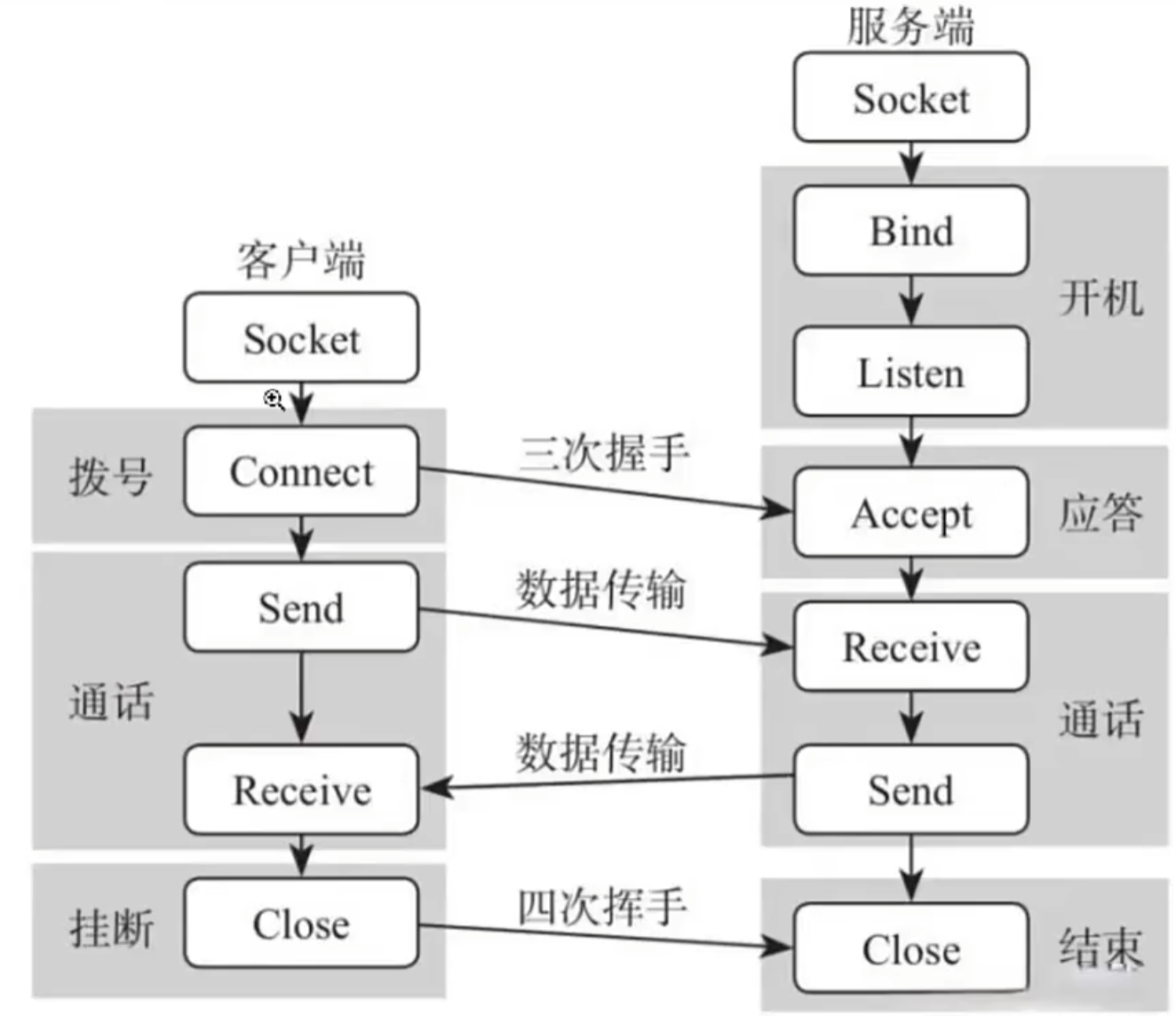
Server:
byte[] readBuff;
string receiveStr;
Main():
{
serverSocket.Bind(IPEndPoint("127.0.0.1",8888));
serverSocket.Listen(0);
==服务器启动成功==
serverSocket.BeginAccept(AcceptCallback, serverSocket);
Console.ReadLine();
}
AcceptCallback(IAsyncResult ar):
{
serverSocket = ar.AsyncState as Socket;
clientSocket=serverSocket.EndAccept(ar);
==有一个客户端Accept==
clientSocket.BeginReceive(readBuff, 0, 1024, 0, ReceiveCallback, clientSocket);
serverSocket.BeginAccept(AcceptCallback, serverSocket);
}
ReceiveCallback(IAsyncResult ar):
{
Socket clientSocket = ar.AsyncState as Socket;
int count = clientSocket.EndReceive(ar);
if (count == 0)
{
clientSocket.Close();
Console.WriteLine("客户端断开连接");
return;
}
receiveStr=Encoding.UTF8.GetString(readBuff, 0, count);
=={receiveStr}==
clientSocket.BeginSend(Encoding.UTF8.GetBytes(receiveStr), 0, receiveStr.Length, 0, SendCallback, clientSocket);
clientSocket.BeginReceive(readBuff, 0, 1024, 0, ReceiveCallback, clientSocket);
}
SendCallback(IAsyncResult ar):
{
Socket clientSocket = ar.AsyncState as Socket;
clientSocket.EndSend(ar);
}
Client:
Socket socket;
byte[] readBuff;
string receiveStr;
Connect():
{
socket.BeginConnect("127.0.0.1",8888, ConnectCallback,socket);
}
ConnectCallback(IAsyncResult ar):
{
Socket socket = (Socket)ar.AsyncState;
socket.EndConnect(ar);
==连接成功==
socket.BeginReceive(readBuff, 0, 1024, 0, ReceiveCallback, socket);
}
ReceiveCallback(IAsyncResult ar):
{
Socket socket = ar.AsyncState as Socket;
int count = socket.EndReceive(ar);
receiveStr = Encoding.UTF8.GetString(readBuff, 0, count);
socket.BeginReceive(readBuff, 0, 1024, 0, ReceiveCallback, socket);
}
Send():
{
string sendStr = InputField.text;
byte[] sendBytes =Encoding.UTF8.GetBytes(sendStr);
socket.BeginSend(sendBytes, 0, sendBytes.Length, 0, SendCallback, socket);
}
SendCallback(IAsyncResult ar):
{
Socket socket = ar.AsyncState as Socket;
int count = socket.EndSend(ar);
==发送成功{count}==
}
TCP:确保数据准确无误的传递
UDP:确保数据实时传递,会产生数据丢失
新创建的Vector3 angle会正常有正负数显示
但是transform.eulerAngles的负值实际为360减去其绝对值(例如面板为10则实际为-10)
但在赋值给transform.eulerAngles会自动转换
但是由于需要每帧更新所以要进行
angle = transform.eulerAngles;
当angle值为负时例如为-10,第一帧正常将transform.eulerAngles设置为-10(实际值为350)
但下一帧进行angle = transform.eulerAngles;时由于 transform.eulerAngles实际为350则angle也变成350,由于clamp的限制(例如限制为-40至40)变为40
所以如果不做处理下落过程中会一直抬头

Mesh Collider:
勾选convex可以简化模型,节省性能
windows-rendering-Linghting-env调整环境光亮度